2.4GHz WiFi provides slower speed after Firmware Upgrade

This thread has been locked for further replies. You can start a new thread to share your ideas or ask questions.

2.4GHz WiFi provides slower speed after Firmware Upgrade

This thread has been locked for further replies. You can start a new thread to share your ideas or ask questions.
2.4GHz WiFi provides slower speed after Firmware Upgrade
2021-02-14 07:16:10
Model: Archer C20  
Hardware Version: V4
Firmware Version: 0.9.1 4.16 v0001.0 Build 181213 Rel.63587n

So, I have been using Archer C20 router for my internet for more than a year now and It worked flawlessly during that time but over a month from now I had been having several internet speed and frequent disconnection issues, At first I thought It was an issue on the ISP's end and I tried using though Direct Cable but doing so I found out that it was not a problem from their end and afterwards which I contacted Customer Support for Tp-Link and they helped me with the issue providing with me some changes to my settings and suggesting a firmware upgrade, For which I complied and they helped me with the process but after doing said firmware upgrade, My 5GHz internet works fine but 2.4GHz doesn't work properly it provides slower speeds (both download and upload) in mobile phones and slower speed for upload in Laptop, Download works fine on the laptop using right now.

I contacted the customer care again and they informed me that it might be an issue with the channel which I suspected but after trying each channel some with varying level of success, It still doesn't work as it used to and one more issue is that the internet just doesn't work as good at a range where it used to before.


If you may please help me with this issue, I'll be grateful. Thank you.

  0      
  0      
#1
Options
4 Reply
Re:2.4GHz WiFi provides slower speed after Firmware Upgrade
2021-03-23 07:12:54 - last edited 2021-03-23 07:13:07

@Atifus 


Please check and ensure the Transmit Power on the C20 is set to be High, then you may try to modify the wireless channel and channel width settings on it to monitor again. As for the 5G channel, you may try 36/40/44/48, channel width 80MHz; As for the 2.4G, you can change the channel to 1/6/11, channel width to 40MHz, or you may run a Wi-Fi analyzer to review the channel, then choose one with better signal.


Please also ensure the firmware on the C20 is up-to-date, you can try to reset it to factory defaults then reconfigure it from scratch to confirm.

2.4G and 5G network have their own advantages and disadvantages, generally. You may check this article to try to improve the coverage of the router:
https://www.tp-link.com/en/blog/87/6-tips-on-where-to-place-your-wireless-router-for-the-best-signal-coverage/

  0  
  0  
#2
Options
Re:2.4GHz WiFi provides slower speed after Firmware Upgrade
2021-03-23 07:43:52

@Kevin_Z 


Hello, my issue has mostly been fixed with a few calls to the Tech Support.


Yes, the system is up-to-date and I am aware of the difference in 2.4GHz and 5GHz bands. I will be considering the steps provided in the article to improve the range.


I however do not know how to check transmit power is set to high or not, could you please inform me.


Also the speed problem still persists in one of my devices, a device issue perhaps, any tips?

  0  
  0  
#3
Options
Re:2.4GHz WiFi provides slower speed after Firmware Upgrade
2021-03-24 01:19:19

@Atifus 


That's great to know that the issue is fixed with the support helps.


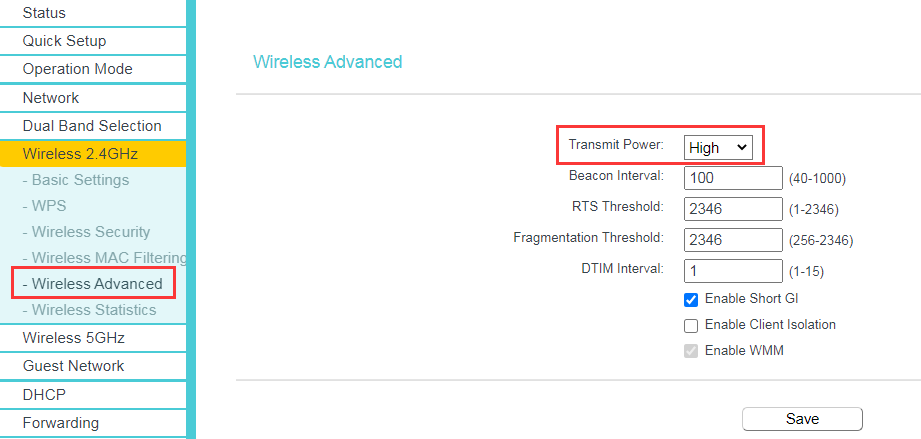
As per the Transmit Power, you can find it on the Wireless 2.4GHz/5GHz > Wireless Advanced page as below:


If only one device is getting slower when connected to the C20 wireless, while others are getting normal, it is suggested to check if you can update the driver version of that device, or update its system, then check if that helps.

  0  
  0  
#4
Options
Re:2.4GHz WiFi provides slower speed after Firmware Upgrade
2021-03-24 05:02:53

@Kevin_Z 


Yes, I checked the Transmit Power is set to high for both the bands.


I'll try updating my device.


Thank you for your help.

  0  
  0  
#5
Options