
Router Issues
 This thread has been locked for further replies. You can start a new thread to share your ideas or ask questions.
Router Issues
This thread has been locked for further replies. You can start a new thread to share your ideas or ask questions.Router Issues
Posts: 6
Helpful: 0
Solutions: 0
Stories: 0
Registered: 2013-01-20

2013-01-20 00:37:38
Posts: 6
Helpful: 0
Solutions: 0
Stories: 0
Registered: 2013-01-20
Router Issues
2013-01-20 00:37:38
Tags:
Region : UnitedKingdom
Model : TL-WDR4300
Hardware Version : V1
Firmware Version : 3.13.23 Build 121225 Rel.37950n
ISP : Virgin Media
Hi Guys,
Was hoping someone on here could help with my problem as TP-Link don't seem to want to at the moment.
I bought the WDR4300 to extend wireless and to remove the issues that Virgin Media's SuperHub brings.
I have tried with all 3 firmware versions to no avail to keep the wireless from dropping or from have internet access completely dropped. The only way to restore internet when it drops is to re-upgrade the firmware and then reset to factory defaults, then I set everything up how it was and it can be either 5 hours or 5 minutes but it will drop again.
Let me know if you need any more information and I will gladly try to provide it.
Thanks in advance for any help you can give,
DBI
Model : TL-WDR4300
Hardware Version : V1
Firmware Version : 3.13.23 Build 121225 Rel.37950n
ISP : Virgin Media
Hi Guys,
Was hoping someone on here could help with my problem as TP-Link don't seem to want to at the moment.
I bought the WDR4300 to extend wireless and to remove the issues that Virgin Media's SuperHub brings.
I have tried with all 3 firmware versions to no avail to keep the wireless from dropping or from have internet access completely dropped. The only way to restore internet when it drops is to re-upgrade the firmware and then reset to factory defaults, then I set everything up how it was and it can be either 5 hours or 5 minutes but it will drop again.
Let me know if you need any more information and I will gladly try to provide it.
Thanks in advance for any help you can give,
DBI
#1
Options
- Copy Link
- Subscribe
- Bookmark
- Report Inappropriate Content
Thread Manage
Module Manage
Announcement Manage
11 Reply

Posts: 2171
Helpful: 2
Solutions: 0
Stories: 0
Registered: 2013-01-12
Re:Router Issues
2013-01-20 01:08:10
Are you losing WAN connection or wireless connection? Are you trying cable connection with router? Please give us screenshot from STATUS your router.
0
We appreciate your feedback. Feel free to let us know more. Log in to submit feedback.
0
We appreciate your feedback. Feel free to let us know more. Log in to submit feedback.
#2
Options
- Copy Link
- Report Inappropriate Content
Thread Manage
Module Manage
Announcement Manage
Posts: 6
Helpful: 0
Solutions: 0
Stories: 0
Registered: 2013-01-20
Re:Router Issues
2013-01-20 01:24:45
at the moment just WAN, all internet access stops. I have 2 machines that connect via cable and they experience the exact same thing. what exactly do you need to see from the status page as its quite long and won't fit in a single screenshot?
0
We appreciate your feedback. Feel free to let us know more. Log in to submit feedback.
0
We appreciate your feedback. Feel free to let us know more. Log in to submit feedback.
#3
Options
- Copy Link
- Report Inappropriate Content
Thread Manage
Module Manage
Announcement Manage
Posts: 2171
Helpful: 2
Solutions: 0
Stories: 0
Registered: 2013-01-12
Re:Router Issues
2013-01-20 01:33:51
what exactly do you need to see from the status page as its quite long and won't fit in a single screenshot?
WAN addresses. What is your WAN configuration, sorry I don't know Virgin Media.
Please you watch WAN diode is stable every time, doesn't switch down? Maybe problem is in wire connection between Virgin Media modem and WAN port in TP-link?
0
We appreciate your feedback. Feel free to let us know more. Log in to submit feedback.
0
We appreciate your feedback. Feel free to let us know more. Log in to submit feedback.
#4
Options
- Copy Link
- Report Inappropriate Content
Thread Manage
Module Manage
Announcement Manage
Posts: 6
Helpful: 0
Solutions: 0
Stories: 0
Registered: 2013-01-20
Re:Router Issues
2013-01-20 02:00:19
WAN addresses. What is your WAN configuration, sorry I don't know Virgin Media.
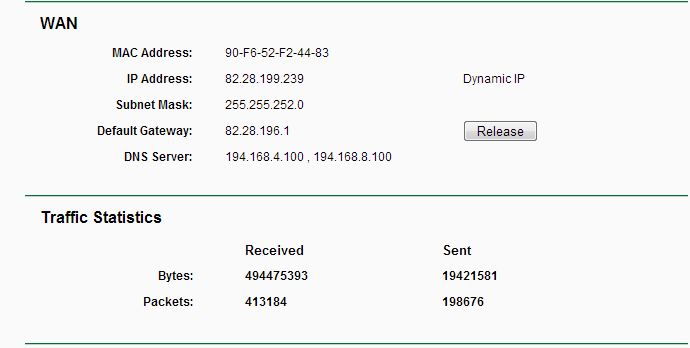
I'm not sure what they are either but the detection seems to be dynamic IP and we weren't given any IP addresses from Virgin Media
Please you watch WAN diode is stable every time, doesn't switch down? Maybe problem is in wire connection between Virgin Media modem and WAN port in TP-link?
There is no indication on the router that the link is dropped. Do you mean the internet status light on the router? if so that blinks happily away
also I don't believe the cable is an issue, before it was used on an unmanaged switch (coincidently also a TP-Link product) with no issues at all
0
We appreciate your feedback. Feel free to let us know more. Log in to submit feedback.
0
We appreciate your feedback. Feel free to let us know more. Log in to submit feedback.
#5
Options
- Copy Link
- Report Inappropriate Content
Thread Manage
Module Manage
Announcement Manage
Posts: 2171
Helpful: 2
Solutions: 0
Stories: 0
Registered: 2013-01-12
Re:Router Issues
2013-01-20 02:09:55
WAN addresses looks ok.
When you have problems with internet access this addresses looks the same? We need to determine where the problem lies in WAN connection or in LAN connection. What is your DHCP configuration? Maybe you must complete gateway and DNS-s addresses.
When you have problems with internet access this addresses looks the same? We need to determine where the problem lies in WAN connection or in LAN connection. What is your DHCP configuration? Maybe you must complete gateway and DNS-s addresses.
0
We appreciate your feedback. Feel free to let us know more. Log in to submit feedback.
0
We appreciate your feedback. Feel free to let us know more. Log in to submit feedback.
#6
Options
- Copy Link
- Report Inappropriate Content
Thread Manage
Module Manage
Announcement Manage
Posts: 6
Helpful: 0
Solutions: 0
Stories: 0
Registered: 2013-01-20
Re:Router Issues
2013-01-20 02:17:43
gateway is set to the router and what should the dns's be, I do not know of any they use, also surely if that was the case then it wouldn't be intermittent but all the time
0
We appreciate your feedback. Feel free to let us know more. Log in to submit feedback.
0
We appreciate your feedback. Feel free to let us know more. Log in to submit feedback.
#7
Options
- Copy Link
- Report Inappropriate Content
Thread Manage
Module Manage
Announcement Manage
Posts: 2171
Helpful: 2
Solutions: 0
Stories: 0
Registered: 2013-01-12
Re:Router Issues
2013-01-20 02:25:02
Try to enter DNS from your ISP 194.168.4.100 and 194.168.8.100 click SAVE and reboot router. After reboot you check connection and internet access.
0
We appreciate your feedback. Feel free to let us know more. Log in to submit feedback.
0
We appreciate your feedback. Feel free to let us know more. Log in to submit feedback.
#8
Options
- Copy Link
- Report Inappropriate Content
Thread Manage
Module Manage
Announcement Manage
Posts: 6
Helpful: 0
Solutions: 0
Stories: 0
Registered: 2013-01-20
Re:Router Issues
2013-01-20 04:34:29
Ok did that about 2 hours ago now and no issues so far, but this could be the randomness of my issue, I will update this either tomorrow or if the problem persists
0
We appreciate your feedback. Feel free to let us know more. Log in to submit feedback.
0
We appreciate your feedback. Feel free to let us know more. Log in to submit feedback.
#9
Options
- Copy Link
- Report Inappropriate Content
Thread Manage
Module Manage
Announcement Manage
Posts: 2171
Helpful: 2
Solutions: 0
Stories: 0
Registered: 2013-01-12
Re:Router Issues
2013-01-20 04:39:18
We will be waiting.
0
We appreciate your feedback. Feel free to let us know more. Log in to submit feedback.
0
We appreciate your feedback. Feel free to let us know more. Log in to submit feedback.
#10
Options
- Copy Link
- Report Inappropriate Content
Thread Manage
Module Manage
Announcement Manage
Posts: 6
Helpful: 0
Solutions: 0
Stories: 0
Registered: 2013-01-20
Re:Router Issues
2013-01-21 05:40:16
Hmm, I posted something but it didn't seem to post, well its been fine ever since I put in those dns entries all seems fine, if it happens again I'll post back here, Thank you for all your help and hopefully for fixing my issue.
Question though, why would that stop internet access after a random amount of time?
Question though, why would that stop internet access after a random amount of time?
0
We appreciate your feedback. Feel free to let us know more. Log in to submit feedback.
0
We appreciate your feedback. Feel free to let us know more. Log in to submit feedback.
#11
Options
- Copy Link
- Report Inappropriate Content
Thread Manage
Module Manage
Announcement Manage
Posts: 6
Helpful: 0
Solutions: 0
Stories: 0
Registered: 2013-01-20
2013-01-20 00:37:38
Posts: 6
Helpful: 0
Solutions: 0
Stories: 0
Registered: 2013-01-20
Information
Helpful: 0
Views: 31
Replies: 0
Voters 0
No one has voted for it yet.
Tags
Report Inappropriate Content
Transfer Module
New message