
My whole network fails on high load
 This thread has been locked for further replies. You can start a new thread to share your ideas or ask questions.
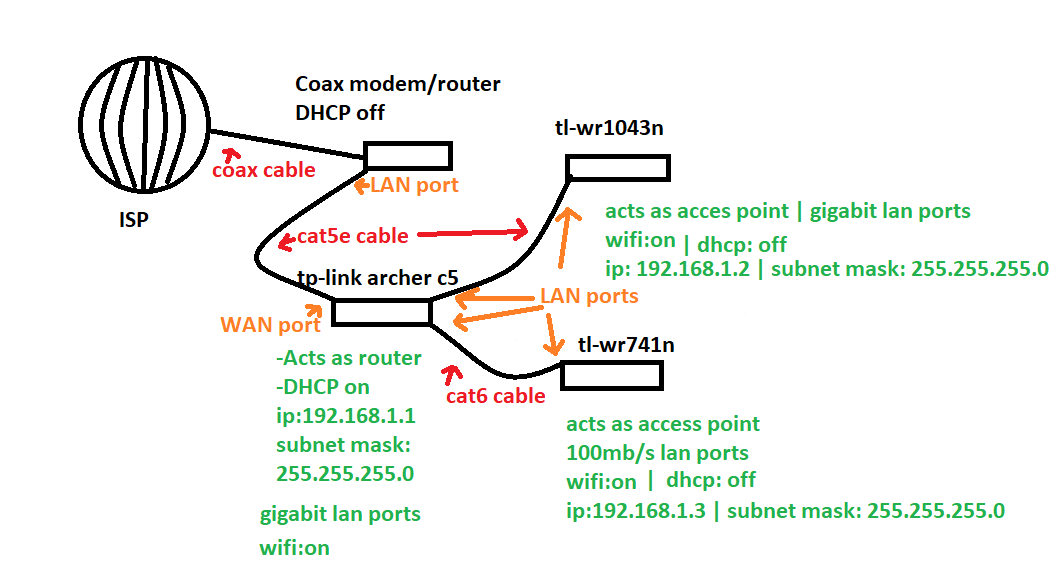
Hello! I have a home network, set up as shown on my kinda trashy picture above.
The WiFi SSID and passwords are different on all of my routers. My PC is connected via cable(cat5) to the WR1043N. It can fully utilize the Gigabit speed.
I have a server PC that is connected to the TL-WR741N via cable (cat5e). It only can use 100/10Mb/s speed, since the older router interface.
WR741N and WR1043N has an IP reservation in the Archer C5 outside the DHCP range, so there shouldn't be any problems with that.
All security options are turned off in WR741N and WR1043N routers.
My whole network is working fine in general. I have 6 computers connected to the internet (all via cable), and 2 laptops via WiFi, alongside with my smart TV and smartphones.
Most of the WiFi devices are connected to the main router (Archer C5).
But doing certain actions makes the whole network in the house shut off, I have no internet, and I can't reach any of the routers by their IP addresses either. To fix this, I have to turn Off then On my main router (Archer C5).
A few of those actions:
-connection my laptop to the network via cable
-use torrent on my laptop
-start heavy downloads on my server PC (for some reason, if I use internet explorer on it, there aren't any problems).
An example from today: I wanted to download a fresh CS server on the serverPC using SteamCMD. It started, but after a few files my network failed. So I had to restart my main router.
Another example from last week: I tried to download Bukkit on my serverPC using Chrome. After 3% of downloading, my network failed, and had to restart my main router. After trying to download it again, this time, with IE, it without any problems.
I tried too much things to list all of them. Without any luck. Tonight I tried to replace my WN741N router with an SMC one, to see, if that router is bad, but the same thing happened. To me, it seems like my main router / the DHCP in it fails, not sure tho.
Any ideas?
EDIT: replacing the 1043N router with the SMC or the 741N one works perfectly. Using ANY router at the end of the Cat6 cable will result in the same network failure. Could it be something with the Cat6 cable?!
Also, the failure happens everytime, when there is a high load the end of the Cat6 cable (i.e. speedtest will result in a failure too).