EAP330 resetting - losing wireless connections
 This thread has been locked for further replies. You can start a new thread to share your ideas or ask questions.
EAP330 resetting - losing wireless connections
Model :
Hardware Version :
Firmware Version :
ISP :
I'm having troubles with an EAP330 resetting. I've tried several things I'll explain below and we seem to have gone from multiple resets a day to maybe 1-2 times a day. Our environment is fairly basic with EAP330, TP-Link 8 port POE switch, and Untangle firewall also acting as DNS/DHCP for the network. No vlans are setup. Most things were set to the defaults. We have 3 Acer Laptops, and 3 Macbook's. We have 3 SSID's, lets call them PinkC5 (5 GHz), PinkC (2.4 GHz), PinkC Guest (2.5 GHz). This is a fairly new setup, approx 1 month.
- At first it seemed to reset every time one of our Macbooks would connect. We found that Macbook was sharing printers. Once disabled, things seemed to improve significantly, but still had resets (all SSID's disappear, no one can connect for a couple minutes until the SSID's show back up.).
- We reside in an office/retail park with many wireless networks. I tried to find channels that were not being used and reset the EAP from auto to the specific channel I found that didn't seem to be in use. I changed both the 2.4 and 5 GHz channels. Currently they are 3 and 161. The EAP still resets.
- I tried connecting all computers to the PinkC5 network initially. I then read somewhere Mac's may have issues with ac networks, so I reconnected all Mac's to the PC network. Again, we made it about 24 hrs with no known resets, until we turned on and Apple TV which had been connected to the PinkC5 network. Based on the Mac ac info, we reconnected the Apple TV to the PinkC network. All was good for about 18 hrs, until the EAP reset again.
- I called TP-Link support initially and we changed a switch setting, but seemed puzzled by the resets. That was before we discovered the first Mac sharing printers.
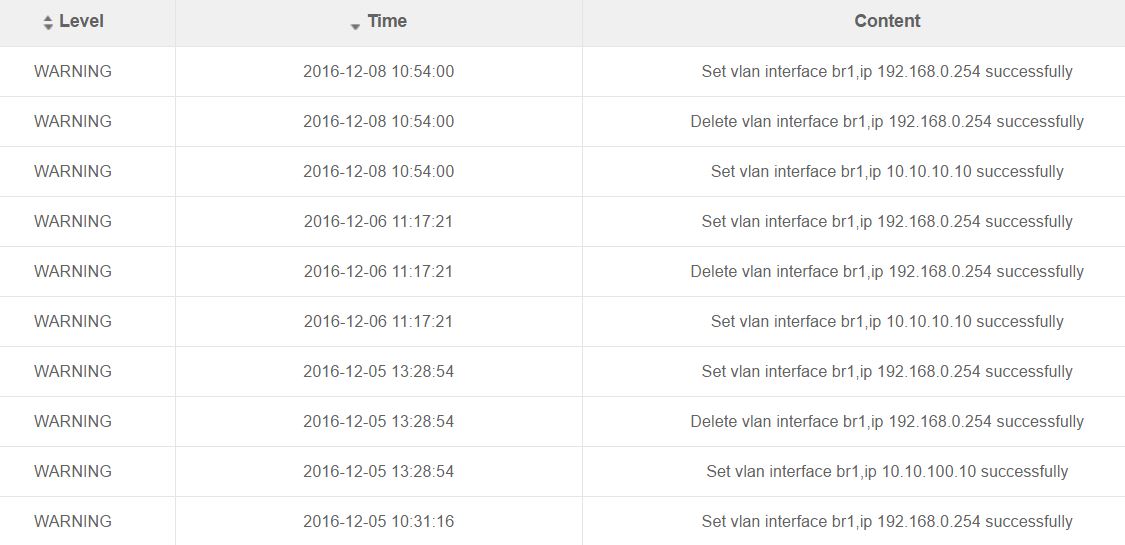
- The EAP log is showing some deleting and setting of vlans, which as I stated above, we haven't knowingly set up any vlans (see image below). The errors mostly appear around the time of the resets, but have had a couple resets that did not seem to produce an error message.
Hardware Version :
Firmware Version :
ISP :
I'm having troubles with an EAP330 resetting. I've tried several things I'll explain below and we seem to have gone from multiple resets a day to maybe 1-2 times a day. Our environment is fairly basic with EAP330, TP-Link 8 port POE switch, and Untangle firewall also acting as DNS/DHCP for the network. No vlans are setup. Most things were set to the defaults. We have 3 Acer Laptops, and 3 Macbook's. We have 3 SSID's, lets call them PinkC5 (5 GHz), PinkC (2.4 GHz), PinkC Guest (2.5 GHz). This is a fairly new setup, approx 1 month.
- At first it seemed to reset every time one of our Macbooks would connect. We found that Macbook was sharing printers. Once disabled, things seemed to improve significantly, but still had resets (all SSID's disappear, no one can connect for a couple minutes until the SSID's show back up.).
- We reside in an office/retail park with many wireless networks. I tried to find channels that were not being used and reset the EAP from auto to the specific channel I found that didn't seem to be in use. I changed both the 2.4 and 5 GHz channels. Currently they are 3 and 161. The EAP still resets.
- I tried connecting all computers to the PinkC5 network initially. I then read somewhere Mac's may have issues with ac networks, so I reconnected all Mac's to the PC network. Again, we made it about 24 hrs with no known resets, until we turned on and Apple TV which had been connected to the PinkC5 network. Based on the Mac ac info, we reconnected the Apple TV to the PinkC network. All was good for about 18 hrs, until the EAP reset again.
- I called TP-Link support initially and we changed a switch setting, but seemed puzzled by the resets. That was before we discovered the first Mac sharing printers.
- The EAP log is showing some deleting and setting of vlans, which as I stated above, we haven't knowingly set up any vlans (see image below). The errors mostly appear around the time of the resets, but have had a couple resets that did not seem to produce an error message.